-
Archives
- August 2025
- December 2024
- November 2024
- January 2024
- December 2023
- October 2023
- January 2023
- October 2022
- August 2022
- May 2022
- April 2022
- October 2021
- September 2021
- April 2021
- March 2021
- December 2020
- November 2020
- October 2020
- September 2020
- May 2020
- November 2019
- August 2019
- October 2018
- August 2018
- June 2018
- March 2018
- December 2017
- October 2017
- September 2017
- May 2017
- April 2017
- February 2017
- January 2017
- October 2016
- September 2016
- August 2016
- June 2016
- February 2016
- December 2015
- November 2015
- September 2015
- August 2015
- July 2015
- June 2015
- May 2015
- April 2015
- March 2015
- January 2015
- December 2014
- October 2014
- July 2014
- May 2014
- April 2014
- March 2014
- February 2014
- January 2014
- December 2013
- November 2013
- October 2013
- September 2013
- July 2013
- June 2013
- May 2013
- April 2013
- March 2013
- January 2013
- December 2012
- November 2012
- September 2012
- July 2012
- June 2012
- May 2012
- April 2012
- March 2012
- February 2012
- January 2012
- December 2011
- November 2011
- October 2011
- September 2011
- August 2011
- July 2011
- June 2011
- May 2011
- April 2011
- March 2011
- February 2011
- January 2011
- March 2010
- January 2009
-
Meta
CS Unplugged Workshop
Posted in Teaching, Tech, Technology, Work
Leave a comment
Pioneer seventh-graders present video games of their own design
By CHRIS LARABEE Staff Writer Published in the Greenfield Recorder : 4/13/2022 4:03:37 PM
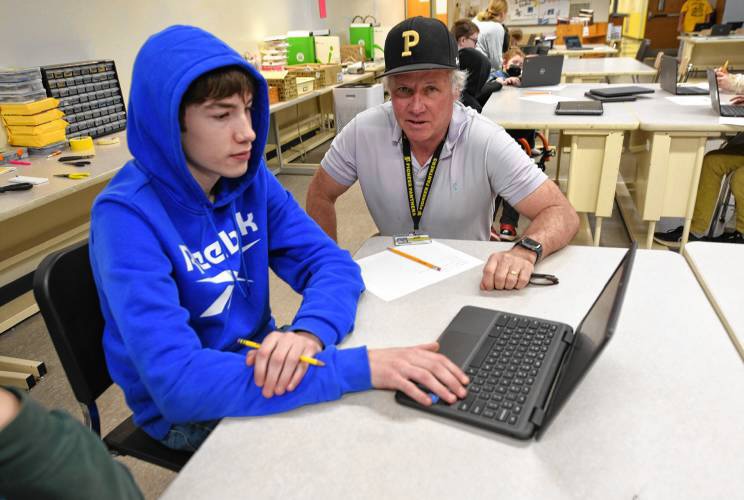
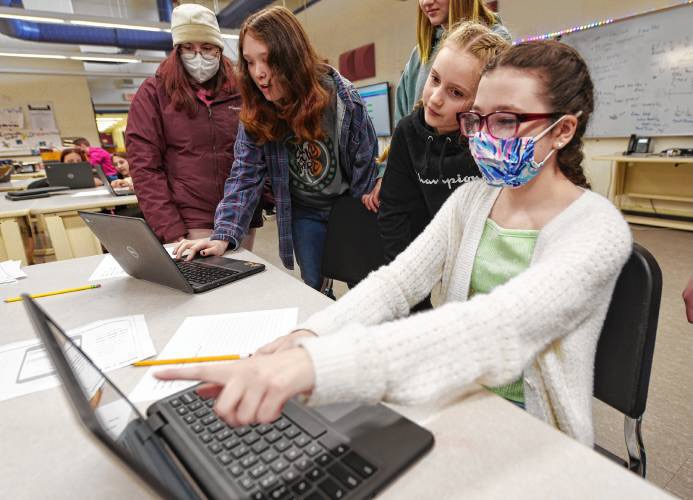
NORTHFIELD — On one screen, a pig hopped over cars and gathered apples as it made its way back to the farm it calls home. On another screen, a player was dodging an evil penguin in a quest to save the Arctic.
These scenes were a few examples of games created by seventh-grade students at Pioneer Valley Regional School, who showed off their video game development and coding skills Wednesday. The showcase was the culmination of a two-and-a-half month computer science unit devoted to coding and programming.
“Nationwide, there’s been an emphasis on teaching coding to students,” said John Heffernan, the class’ teacher. “How do we keep kids coding? We think this is going to help.”
Over the course of the unit, the students learned the basics of coding and were given free range to create any game they wanted.
“It was really hard,” said student Kallie Kratz, who created a game she described as a “sort of penguin version of Mario.” “It took me a few weeks. I had to come up with all the characters and make the platforms.”
Kallie said it was really fun to create her game, even though she doesn’t want to pursue programming in the future.
“I’m still glad I got to do it,” Kallie said.
Nora Cutting, who created the game — titled “Lost and Found” — about the pig returning home, said coding the game was a great experience and it was nice to see her plans come together.
“It was exciting,” Nora said, adding that it was “something for fun” as she, likewise, has no desire to be a video game designer in the future.
Jackson Glazier said he “didn’t know what to make” and came up with the idea of a platforming game where the goal is to collect fried chicken.
“It was difficult,” Jackson said, “but it all came together.”
Coding the games, while fun, also provides an opportunity to build on problem-solving skills that are needed to fix coding errors.
“Even if you don’t become a programmer, it should help you in many cases,” Heffernan said. “It helps people think in terms of algorithms” and sharpens “computational” thinking, which can apply to many aspects in life.
Heffernan said the process has been a great experience for his students and the game showcase was where the kids could share what they’ve made and receive feedback on their creations.
“It’s rewarding” for the students, Heffernan added. “It’s a real audience and their peers get to experience what they made.”
Chris Larabee can be reached at clarabee@recorder.com or 413-930-4081.
https://www.recorder.com/Pioneer-seventh-graders-present-video-games-of-their-own-design-45923991
Posted in Teaching, Tech, Technology
Leave a comment
3D Printed Custom LEGO Parts
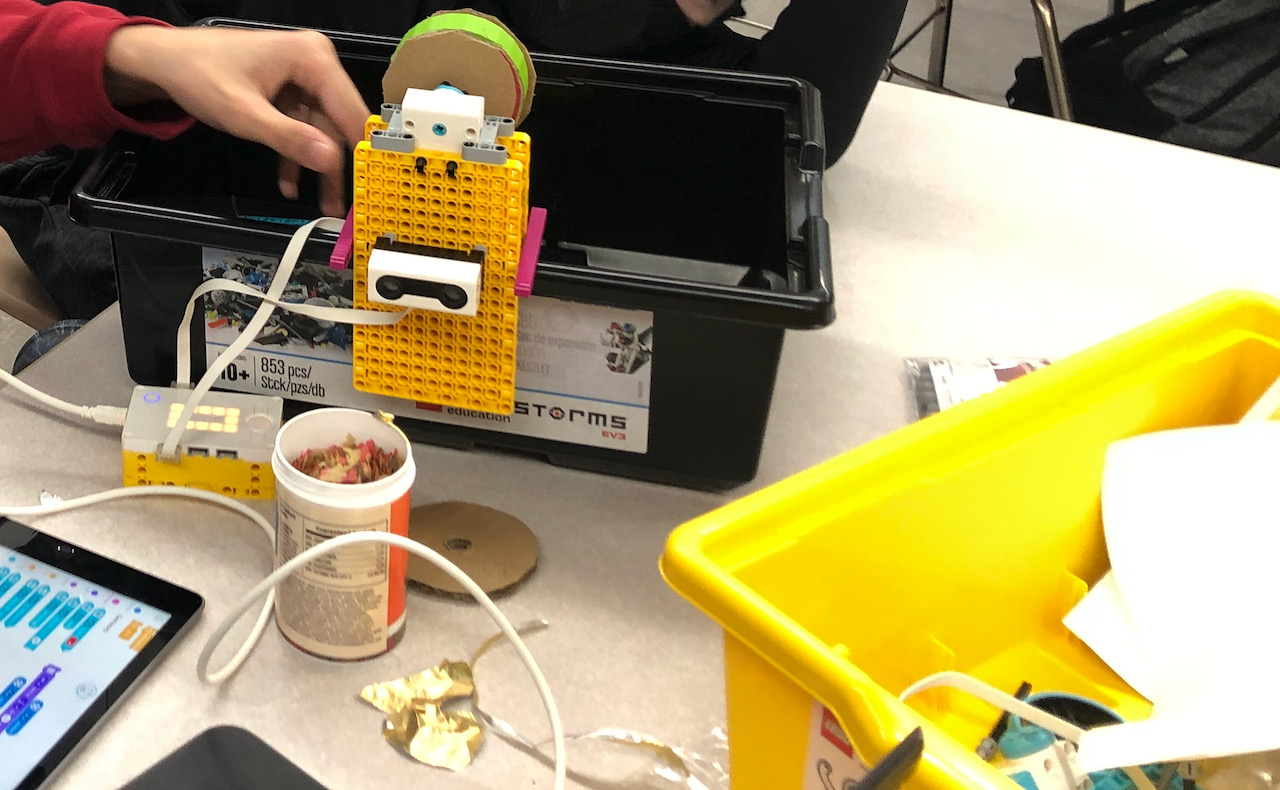
High school students are making robotic fish feeders that help fish owners when they go away for the weekend or for vacation. This is a Tufts Center for Engineering Education and Outreach (CEEO) project that we use in the Teaching Engineering Education Program (TEEP) program that I adapted for high school studdents. For these projects, students are either using all LEGO or are combining LEGO and 3D printed, laser cut, or hand crafted parts. Many of the student fish feeders have 3D printed dispensers glued to a LEGO axle.
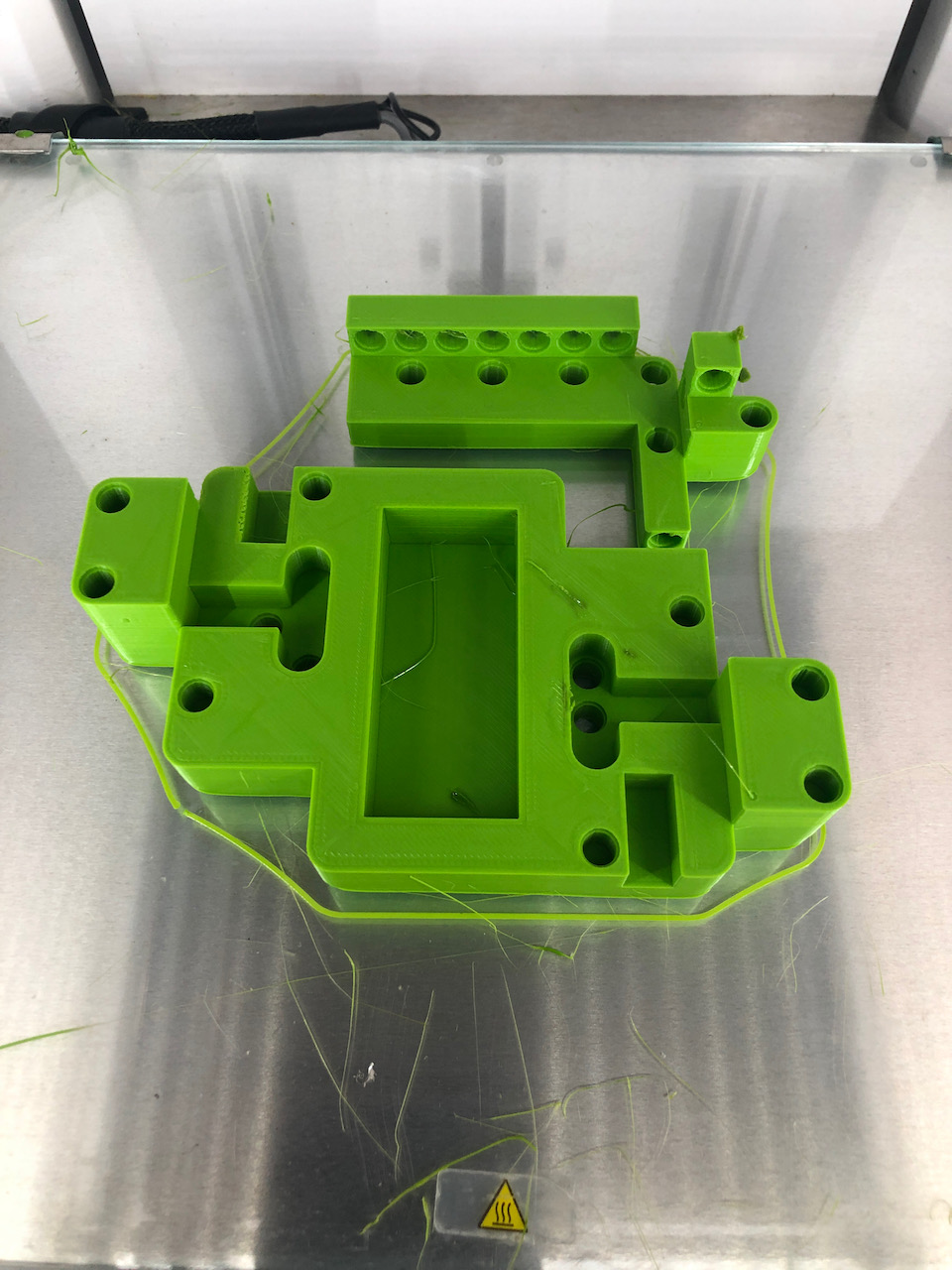
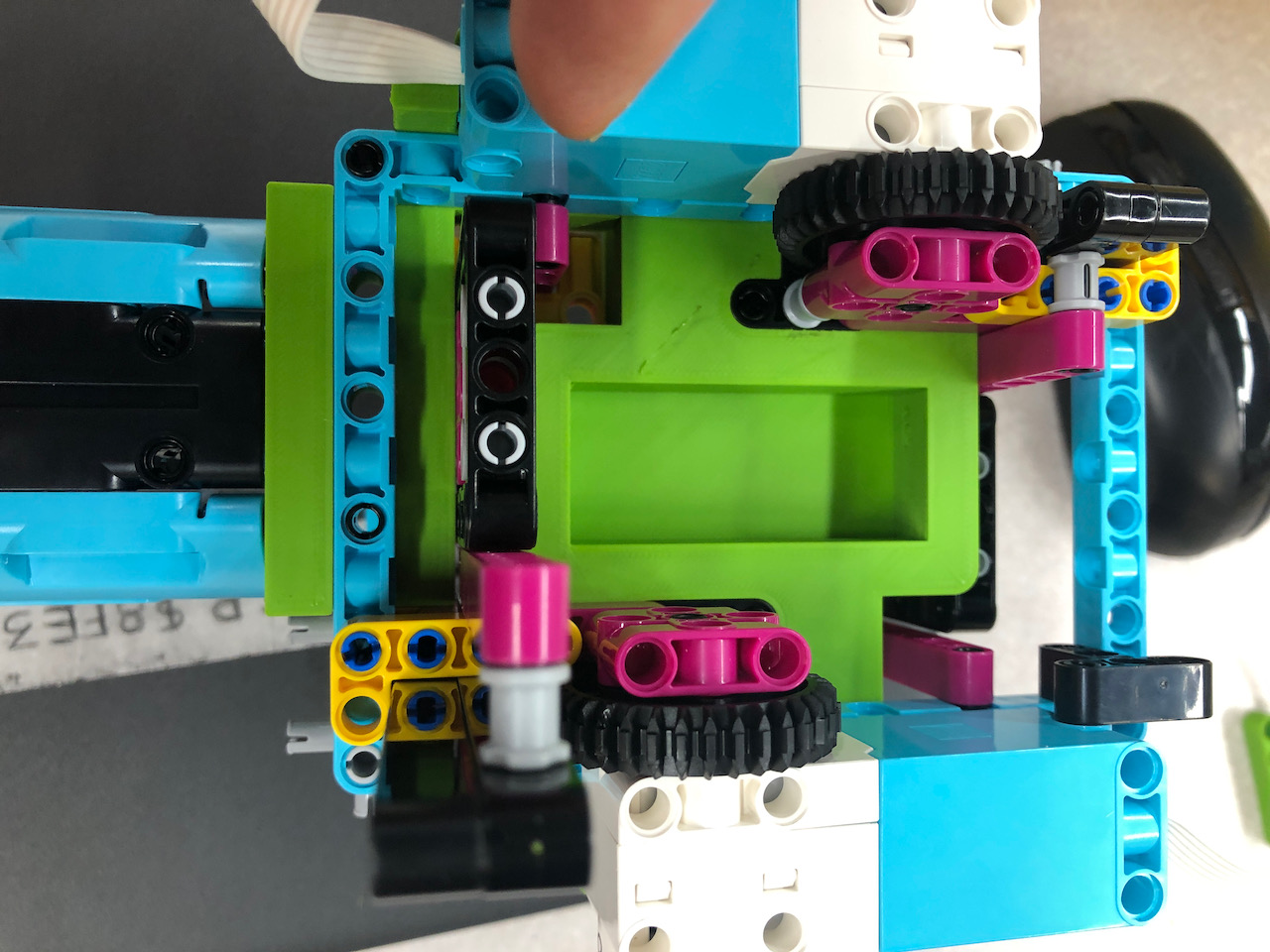
One my Engineering Design 2 students went a step further and made a very sophisticated custom LEGO piece a the hear of his fish feeder. He designed it in TinkerCad, sliced in Cura, and printed on an Ultimaker 2+ 3D printer.
Posted in Kids, Robotics, Teaching, Technology
Leave a comment
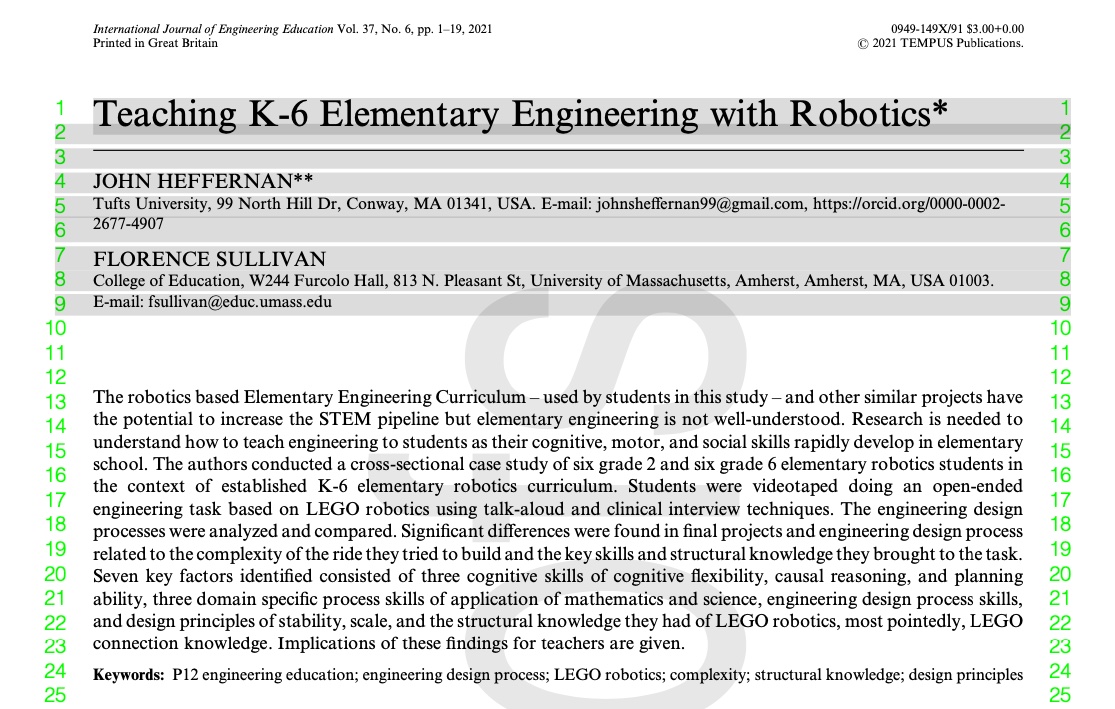
Teaching K-6 Elementary Engineering with Robotics
International Journal of Engineering Education Vol. 37, No. 6, pp. 1–19, 2021
It only took 5 years to get this paper through the academic publishing world. It’s basically the main results of my 300 dissertation condensed down to 18 pages. It should be relatively readable for all. Very happy to get it out there. Hopefully, it will help contribute to the field of K-6 engineering education using robotics. Thanks to co-author Florence for encouraging me to persist in getting this out.
Posted in Child Development, Research, Robotics, Teaching, Technology
Leave a comment
Coming Soon to a University Library Near You!
It only took 5 years to get through the academic publishing world. The main results of my 300 dissertation condensed down to 18 pages. Should be relatively readable. Very happy to get it out there. Hopefully, it will help contribute to the field of K-6 engineering education using robotics. Thanks to co-author Florence for encouraging me to continue.
Teaching K-6 Elementary Engineering with Robotics
International Journal of Engineering Education Vol. 37, No. 6, pp. 1–19, 2021
Posted in Child Development, Research, Robotics, Teaching, Technology
Leave a comment
Tips for Making Concurrent Teaching More Face to Face
With many schools moving from hybrid or remote to in-class learning, I wanted to discuss ways to restore more of a face to face feel to classrooms. In Massachusetts, families still have the option of staying remote and about 10% of our middle and high school students are staying remote. What this means is that we still have to teach concurrently for most or all of our classes. The challenge we face is how to restore a more face to face feel to our classes while still providing an equitable, quality learning experience for remote students. Some specific goals are:
- We don’t want to kids to feel they may as well be at home,
- We want to “make up” for lack of connection and social-emotional health during remote and hybrid modes,
- We want opportunities to be offline and physical and to have no screen times.
It’s helpful to think about two models for teaching concurrently. I call them As If All Remote and As If All In-Class. For a full explanation, see the podcast below or read the summary shown after the video.
As If All Remote
Treat all students as if they are remote. All students are in same Google Meet whether in-class or remote. Students may have headphones and be locked into the laptop. Note: you don’t really need in-class AV projector as all students have presentations in front of them.
PROS:
All students same AV and teaching and learning experience.
Students can interact with each other easily via chat or speaking.
Students can hear and be seen by each other easily.
CONS:
Limits in-class students to remote experience, which lacks a face to face feel.
Lots of screen time, students and teacher may experience “Zoom burnout”
It’s hard to get students to participate.
There can be lots of additional prep such as shared docs and new tools.
Students can feel as if they may as well be home.
As If All In-Class
Treats all students as if they were in class with remote students just being “a little farther away” and accessible via technology. Only remote students are in Google Meet. In-class students treated as normal face to face students. Note: you use in-class AV used as it would be normally.
PROS:
Can maximize face to face experience for in-class students.
Familiar and comfortable for teachers and in-class students.
Can be good for lecture mode and/or mobile teacher using iPad or ThinkPad presenting but walking around class.
CONS:
Hard to have 2 way experience for remote students.
Equity issue may arise if remote students have different (not as good) experience.
Remote students hearing and seeing in-class student comments is challenging (pro video conference equipment may be able to mitigate this).
Remote students seeing actual chalkboard or whiteboard difficult (using teacher device best using tools like JamBoard or iPad with Apple Pencil) but that can cause reverting back to As If All Remote).
Feedback and echo issues can arise if in-class students use their devices, even intermittently to comment/share.
As more and more students return to the class but we still have some remote students that require us to teach concurrently, what are some ways to make As If All Remote feel more face to face? A lot depends on content area and our personal pedagogy and but here are some things I have tried.
- Have only remote students in Google Meet (or equivalent) when no interaction between students is required. Examples of this are: teacher talk, mini-lessons, teacher only questions (repeat for each group). In-class students use in-class AV and listen to teacher directly. This is essentially switching to As If All In-Class when possible. If some interaction is needed, you can do your whole class Meet at the very start of class using chat, checks-in, questions, discussions, and presentations and in-class students can exit Meet after that.
- Untether yourself from your device and desk as much as possible.
- Walk around in class during independent work; combine with 1×1 breakout room check-ins with remote students; don’t forget to monitor for remote students asking for help if you are walking around.
- Use a mobile device for presentations that are sent to Meet and projector, walk around the class when presenting.
- Seems obvious but use mask breaks to talk to students. I have also been making sure middle schoolers leave their phones behind on mask breaks so they get a screen break.
- Always start 1×1 remote checkins with a connection question or comment to the student. For example, I saw your game night or a simple, “How are you?”
- Increase face to face time with students with lunches in class, clubs, etc.
- Offer a paper option to further decrease screen time and give students a chance to use their fine motor skills.
- Restore hands-on activities that you may have been doing with demos or simulations (with materials sent home to remote students).
- Record lectures as podcasts and use class time for working with content independently, with partners, or with teacher.
- Replicate your face to face teaching style as much as possible.
In terms of replicating my face to face teaching style that means short meetings at the start of class to set goals, do attendance, go over logistics, and to provide mini-lessons and content as needed for the current engineering or Computer Science project. A Google Meet worked fine for this though it was harder to discern how I was being received than it would have been face to face. It was also hard to know if students were attending to what I was saying, especially for remote students. After the Meet, I constantly meet with students to check on progress and help with any issues they are encountering, which is exactly what I do normally. A Google Meet 1 to 1 breakout room worked fine for remote students. For middle school students doing coding with Computer Science Discoveries from code.org, I set up a desk near my desk to do a screen share so I could see their screen better – without getting too close. However, we talked directly rather than using headphones to maximize the face to face feeling. I also used the Google Meet for student presentations of their work – a Google Slide for engineering students with the student narrating. For computer science students, I would posting a link in Google Meet Chat for all students to try the project or web site created. The other students gave feedback in Chat and seemed more comfortable with that rather than unmuting and speaking with their microphone. This would be done with the whiteboard/TV and WIFI Airtame projection normally. I frequently had that going in adddition to the Meet so students could either look at the TV or their Chromebook.
In summary, since I could send robot kits and Arduino kits home for engineering students and CSD was all online, I felt I got close to providing what I would do normally. The exception is that we did not work in groups nearly as much and troubleshooting robot and circuit issues took considerably longer with remote students. It was just much harder see what they were doing. I ended up asking students to email photos of their circuits back and forth a lot whereas if they were in-class, I could quickly see what they were doing and point out possible issues. However, all in all, I felt like I came very close to provide what I would in a normal year.
Posted in Kids, Robotics, Teaching, Tech, Technology
Leave a comment
Pioneer Valley Regional School Innovation Center Update
The Innovation Center goals are:
- Teach Middle School computer science and high school engineering design
- More generally, teach innovation, the application of math, science, the engineering design process, and presentation and documentation skills
Our focus is on hands-on, creative doing of projects (after learning the technologies and math and science involved). Even with COVID, high school engineering design students have completed robotics and electronics projects taking home materials as needed. Middle schoolers work on a computer programming platform (using their Chromebooks) called Computer Science Discoveries from code.org
- Example engineering design projects: COVID apps, social distance robot, make your own switches (from office supplies), 3D printing, laser cutting and CNC routing (coming soon), drones, Arduino microcomputers and circuits, and design your own musical instrument.
- Middle school web sites using HTML and CSS, design and code your own computer games, design your own COVID apps.
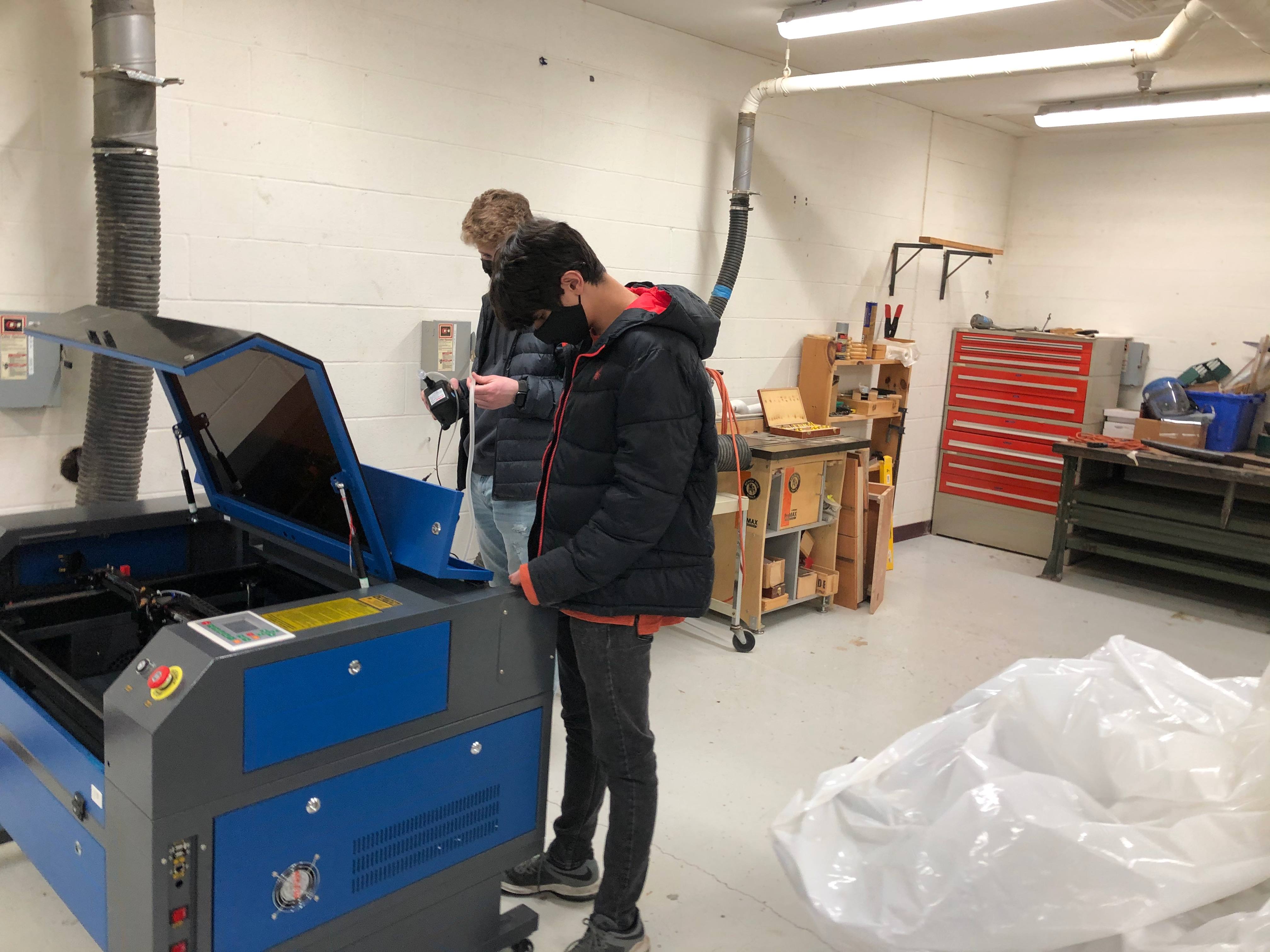
As as add more high tech fabrication equipment, Facilities has completed a much needed and overdue cleanup of the shop, which has become a place to fabricate parts for design projects out of: wood (using traditional wood tools and machines), 3D printing, laser cutting, and CNC routing. See below for a photo of high seniors Max and Nolan setting up the laser cutter.
Links/Examples
How I Used COVID Itself to Motivate My Tech Students and Why They Liked It
https://kidsengineer.com/?p=1630
COVID Apps Student Presentation
Social Distance Robot Student Presentation
Bulldozer Bot Student Presentation
Grade 7 Web Site Samples
Bryanna [Sustainable Clothes] https://codeprojects.org/gFZKELmYGy5J302hx_JbDj9bvD2jvVmOJw0YnE0zNrY\
Anthony [Pickles] https://codeprojects.org/nd0a4BgDXPJxKI8mR7o31AQgcbUCeVy5ZkNWieOXHLI
Dani [Whitewater Rafting]
https://codeprojects.org/3gjtY248G0jV1qTs2tpUDxhvVbnE_-Fq76PfH4bdLUU/
Design Your Own Musical Instrument (Greenfield Recorder) https://www.recorder.com/PVRSD-students-building-instruments-34124852
Posted in Research, Robotics, Teaching, Tech, Technology
Leave a comment
How I Used COVID Itself to Motivate My Tech Students and Why They Liked It
The Challenge
I was faced, at the start of the year, with creating curriculum for a new middle school Computer Science courses centered on Computer Science Discoveries (CSD) from http://code.org/. I also had to create new robotics engineering projects for high school engineering students, many of whom I had last year and who had already completed my tried and true robotics projects.
I wanted students to be empowered to create solutions to pressing real-world problems. That is our end goal ultimately, so why not start now? So, I created two new projects that focused on COVID.
Another challenge was that projects needed to be able to be done all remotely or with a mix or remote and in-class students. Note that I was lucky to be able send LEGO Education EV3 robot kits home if I needed to. The CSD curriculum is web-based and available from home or school.
Design Your Own COVID App Project
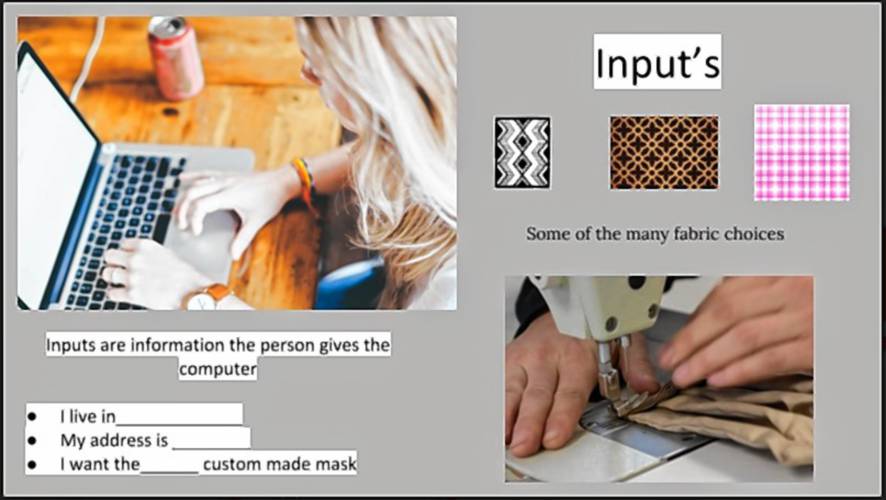
Middle school students first learned the basics of computers and computer programing. They studied the key concepts of problem scoping, input, output, processing, and storage from CSD. The standard CSD curriculum has a design your own app project at the end of the first unit that I modified to focus on solving a COVID related problem. I was impressed by how each student designed an app that strongly reflected their own concerns and interests.
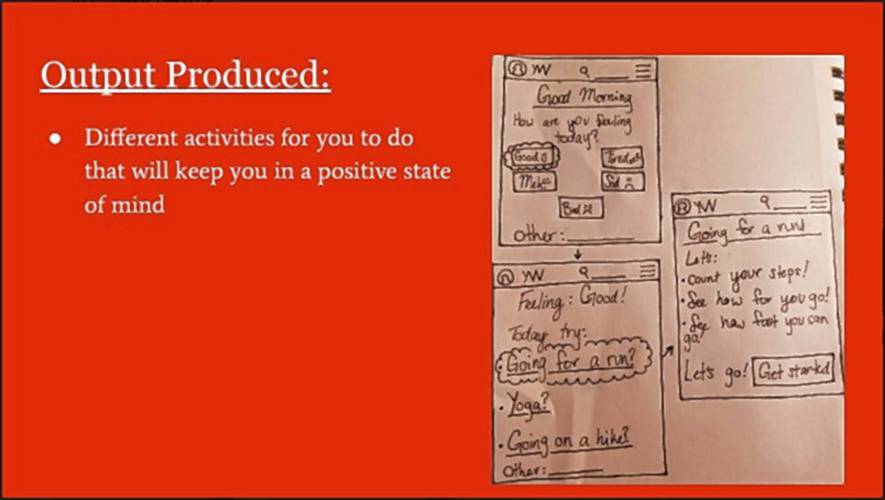
Apps designs were documented in a series of Google slides, which included drawings of the main screens. The slides were presented by each student to students remotely and in class concurrently in a Google meet. Students were eager to present their creative work even though most were not so eager to speak on in Google Meets.
Here are some example slides.
Here’s a complete presentation from Rachel. Her app educates people about COVID and how to stay safe.
She remarked that the project forced her to consider the perspectives of a wide variety of people, including people who were not aware of or in denial of the risks of COVID.
It’s really fun. You get to be creative and think of things differently. Like look at different perspectives, like looking into the perspective of people not completely understanding how they should be handling Corona Virus. Rachel, Grade 8
Social Distance Robot Project
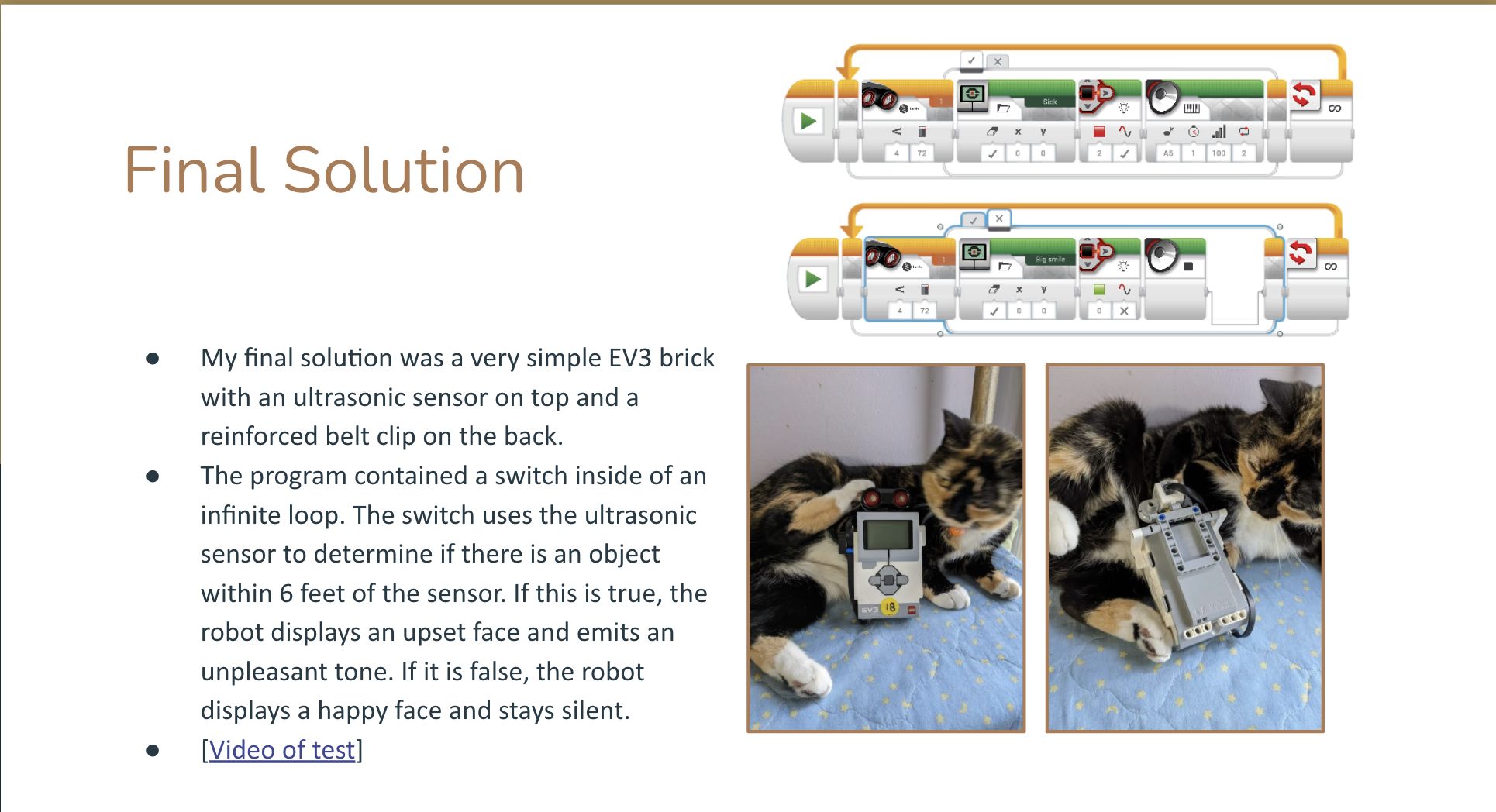
High school students were challenged to design and prototype a wearable or stand-alone robot that helped with social distancing. They went through a research, planning, building, test, redesign, and share out engineering process using the LEGO Education EV3 robot kit. They presented Google slides to the other students, whether in-class or remote. The two slides below are from a student whose family choose remote schooling all year, for example.
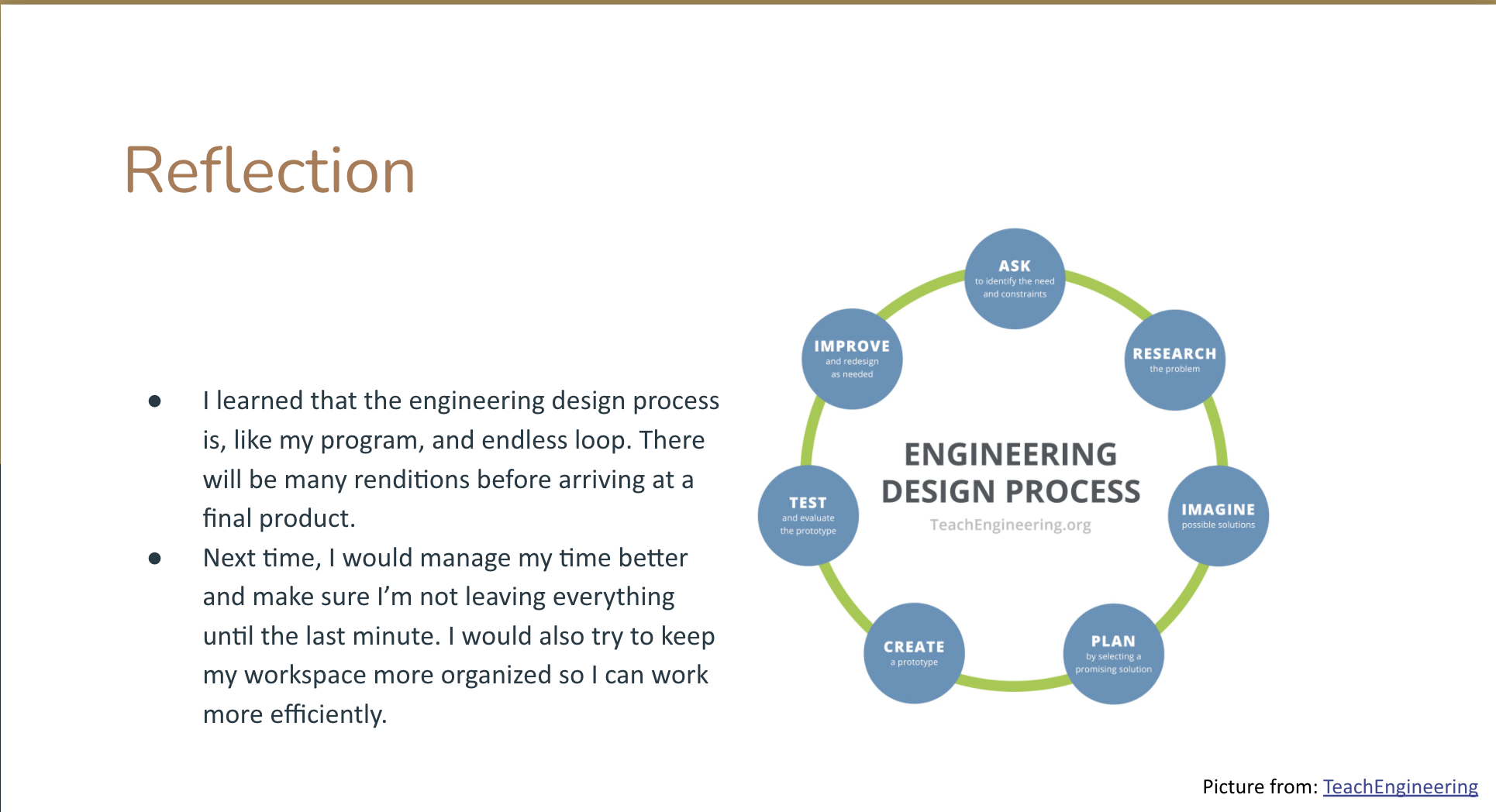
Jessie, Grade 11 Student
Jesse, like many students during remote learning, commented on the challenges of organizing their time and materials at home. This is an important skill that the pandemic and remote school forced to the forefront. I wondered if the problem was that students depended too much on the frequent teacher student feedback loop that goes on during in-class learning.
Here’s a complete presentation from senior Max, who challenged himself to use three motors.
That rotating turret component I don’t think it’s even necessary but I decided to challenge myself and it worked out great. Max, Grade 12 Student
What Students Liked
Eleven middle and high school students (n=11) gave permission to be interviewed. I asked them a few questions to try better understand their experience doing the COVID projects. Many common themes emerged, some expected and some not so expected.
As I thought, hands-on (n=5 instances) projects were perceived as fun by students (n=13). Students also liked that the projects were challenging (n=5) and open-ended, the latter often expressed as not having any limits (n=5). These latter two I did not expect. I thought it was all about the my projects being fun and creative and not so much as being hard and challenging.
I think it was really fun. It wasn’t the easiest thing to do but it was fun to think and be open to a bunch of things and possibilities because there weren’t any limitations.
I liked it. It was pretty interesting. You had to think.
Creativity was often mentioned (n=6) as a reason for the projects being fun.
Unlike most of the school projects I found it pretty interesting and fun. For once, we actually got to use our creativity – without too many constraints – to be able to do a school project. Yeah, I enjoyed it.
I was not expecting this but the student responses revealed how they were feeling about COVID. The experience may have helped students process their feelings about being in a pandemic. Some viewed the project as being relevant (n=2) and solving a real need (n=9).
I think was pretty fun specially because it’s a very unique project especially since we are in such a unique time right now and I like how the project was catered to what’s happening in the real world right now.
It just really made me think of a social distancing and how important it is to social distance. Other than that, this robot isn’t a solution or isn’t a cure for the actual virus but it can just ease the situation at hand.
At least one student also made the explicit connection with the importance of engineering in solving COVID and other pressing issues. This made me feel good about being a former engineer trying to get students excited about engineering.
Yeah, I think it did I think it has taught me that engineering is pertinent in every aspect of life – especially COVID – because you need engineers to… Say you’re doing research: you’re trying to find a vaccine, you’re trying to figure out what will prevent it from spreading, and you need to use engineering to find solutions to those problems.
Some students combined the many themes together.
It was very interesting because I didn’t have like a certain design that I had to create and it’s like I could virtually make anything. That’s where my creative side comes in and I can take whatever is inside the kit that was given to us and create a robot and is very cool because I am a hands-on person. So, I like working on what is directly what’s in front of me instead of like working on a computer.
Take Away
In summary, the COVID projects met my curriculum goals in a fun, challenging, and relevant way for students. While I expected that students would perceive the work as fun and creative, I was pleasantly surprised that students found the open-ended aspect of the projects challenging in a good way. The projects as revealed students’ feelings about COVID and seemed to help them process those feelings.
Middle and High School Students Enjoy Challenging and Relevant COVID Tech Projects
Middle and high school students at the Pioneer Valley Regional School recently completed COVID related Computer Science (CS) and engineering projects.
I was faced, at the start of the year, with creating curriculum for a new middle school Computer Science courses centered on Computer Science Discoveries (CSD) from http://code.org/. I also had to create new robotics engineering projects for high school engineering students, many of whom I had last year and who had already completed some good robotics projects.
I want students to be empowered to create solutions to pressing real-world problems. That is our end goal ultimately, so why not start now? So, I created two new projects that focused on COVID.
Another challenge as that projects needed to be able to be done all remotely or with a mix or remote and in-class students. Note that I was able send LEGO Education EV3 robot kits home if I needed to and the CSD curriculum is web-based and available from home or school.
Middle school students learned the basics of computers and computer programing studying the key concepts of problem scoping, input, output, processing, and storage from CSD. The standard CSD curriculum has a design your own app project at the end of the unit that I modified to focus on solving a COVID related problem. I was impressed by how each student designed an app that strongly reflected their own concerns and interests.
Apps designs were documented in a series of Google slides, which included drawings of the main screens. The slides were presented by each student to students remotely and in class concurrently in a Google meet. Here are some example slides.
Here’s a complete presentation from Rachel. Her app educates people about COVID and how to stay safe.
She remarked that the project forced her to consider the perspectives of a wide variety of people, including people who were not aware of or in denial of the risks of COVID.
It’s really fun. You get to be creative and think of things differently. Like look at different perspectives, like looking into the perspective of people not completely understanding how they should be handling Corona Virus.
High school students were challenged to design and prototype a wearable or stand-alone robot that helped with social distancing. They went through a research, planning, building, test, redesign, and share out engineering process using the LEGO Education EV3 robot kit. They presented Google slides to the other students, whether in-class or remote. The two excerpted slides below are from a student whose family choose remote schooling all year, for example.
This student, like many students during remote learning, commented on the challenges of organizing time and materials on their own at home. This is an important skill that was forced to the forefront. I reflected on my own process that students and teachers depend on the frequent teacher student feedback loop that goes on during in-class learning.
Here’s a complete presentation from Max, who challenged himself to use three motors.
That rotating turret component I don’t think it’s even necessary but I decided to challenge myself and it worked out great.
Selected middle and high school students (n=11) gave permission to be interviewed. I asked them a few questions to try better understand their experience doing the COVID projects. Many common themes emerged, some expected and some not.
As I expected, hands-on (n=5) projects were perceived as fun by students (n=13 instances). I did not expect this to be tied in with being challenging (n=5) and open-ended, the latter often expressed as not having any limits (n=5).
I think it was really fun. It wasn’t the easiest thing to do but it was fun to think and be open to a bunch of things and possibilities because there weren’t any limitations.
I liked it. It was pretty interesting. You had to think.
Creativity was often mentioned (n=6), frequently as a reason for the projects being fun.
Unlike most of the school projects I found it pretty interesting and fun. For once, we actually got to use our creativity without too many like constraints to be able to do a school project. Yeah, I enjoyed it.
I was not expecting this but student responses revealed how they were feeling about COVID and may have helped students process their feelings about being in a pandemic. Some viewed the project as being relevant (n=2) and solving a real need (n=9).
It just really made me think of a social distancing and how important it is to social distance. Other than that, like this robot isn’t a solution or isn’t a cure for the actual virus and it can just ease the situation at hand.
I think was pretty fun specially because it’s a very unique project especially since ran such like a unique time right now and I like how the project was sort of catered to what’s happening in the real world right now.
At least one student also made the explicit connection with the importance of engineering in solving COVID and other pressing issues.
Yeah, I think it did I think it has taught me that engineering is pertinent in every aspect of life – especially COVID – because you need engineers to… Say you’re doing research: you’re trying to find a vaccine, you’re trying to figure out what will prevent it from spreading, and you need to use engineering to find solutions to those problems.
Some students combined the many themes together.
It was very interesting because I didn’t have like a certain design that I had to create and it’s like I could virtually make anything like that’s where my creative side comes in and I can take whatever is inside the kit that was given to us and create a robot and is very cool because I am a hands-on person. So, I like working on what is directly what’s in front of me instead of like working on a computer.
In summary, the COVID projects both met the curriculum goals but in a fun, challenging, and relevant way for students. While I expected that students would perceive the work as fun and creative, I was pleasantly surprised that students found the open-ended aspect of the projects challenging in a good way. The projects as revealed students’ feelings about COVID and seemed to help them process those feelings.
Posted in Kids, Research, Robotics, Teaching, Technology, Work
2 Comments